Home › Features › Automatic encrypted backup & restore
Automatic encrypted backup and restore
Your vault backs itself up to a folder you choose. Every backup is read back and verified, and it restores on a new phone.
The 5-second moment
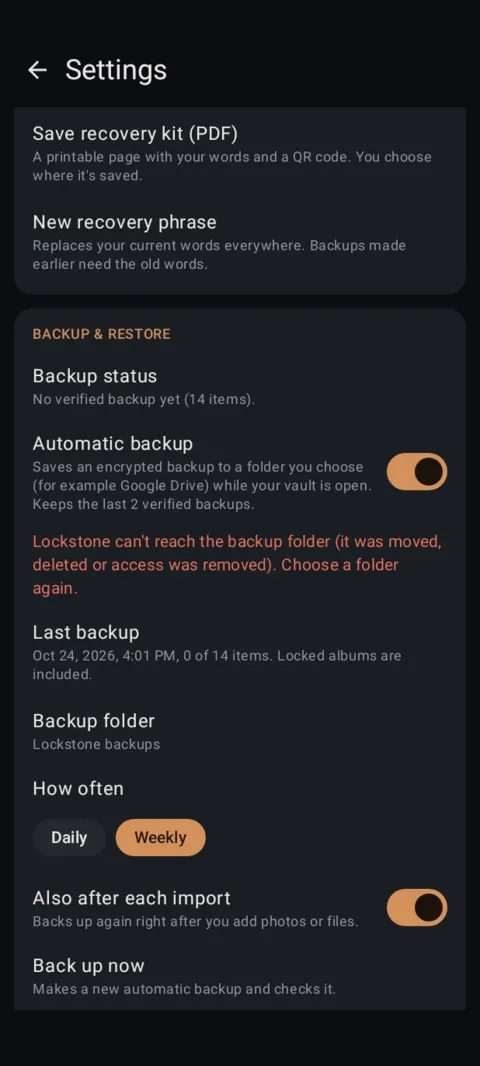
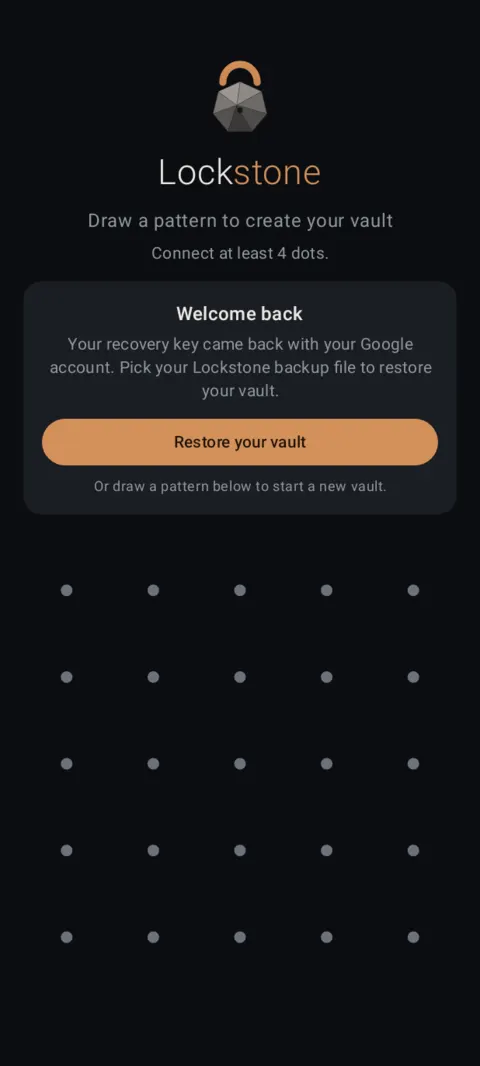
Backups save themselves to your folder. New phone? “Welcome back”: pick the file and your vault returns.
 Free on Google Play. No account, no ads, no tracking.
What it does
- One encrypted
.lockstonefile, saved through Android's folder picker: Google Drive, a USB drive, an SD card or any folder. Lockstone never sees where. - Automatic backup (off until you turn it on): daily or weekly, and optionally after each import. It runs while your vault is open. Nothing runs in the background while it's locked.
- Every backup is read back and verified. Lockstone keeps the last 2 verified automatic backups and shows “N of M items” backed up.
- Warnings appear if a backup is overdue, the folder is gone, or the last attempt failed.
- Verify any backup file with a test restore that changes nothing.
- Backups include locked albums. Backup and restore are always free.
How to use it
Menu names are exactly as they appear in Lockstone 1.1.1. The gear icon at the top right of the Vault screen opens Settings.
- Open your vault and tap the gear icon.Go to Settings › Backup & restore.
- Turn on Automatic backup and choose a folder.Pick a folder that isn't only on this phone, such as Google Drive. It shows as Backup folder.
- Pick how often.How often: Daily or Weekly. Turn on Also after each import if you like.
- Make one now.Tap Back up now. Check Last backup for the date and item count.
- Test it.Verify a backup file (test restore) reads every item without changing anything.
- Restore on a new phone.Install Lockstone from Google Play, tap Restore from a backup (or Restore your vault on the Welcome back screen) and pick your .lockstone file. Enter your recovery words if asked.
A backup opens with your vault's recovery key. With automatic recovery on, that key comes back on a new phone signed in to the same Google account. Otherwise you'll need your 12 recovery words or recovery kit. Without the key, a backup can't be opened by anyone. How recovery works.
Free Included in the free plan. See plans.
Questions
Where are backups stored?
Wherever you choose through Android's folder picker. If you pick a Google Drive folder, the Drive app uploads the encrypted file; Lockstone itself has no internet permission.
Can Google read my backup?
The file is encrypted inside Lockstone before it's saved, so whoever stores it sees only encrypted data.
Do I need Pro to back up or restore?
No. Backup, restore, export and viewing are always free, even if Pro ends.
Does automatic backup drain the battery?
It only runs while your vault is open: after an unlock when one is due, after imports if you choose, or when you tap Back up now.
Related features
Related guides
- How to back up and restore a photo vault
- Photo vault with no account: what if you forget your pattern?
Prefer to watch? See the how-to videos.
No account. No ads. No tracking.
Lockstone is free for up to 100 photos and 10 videos per vault, with every security feature included.