Home › Features › Recovery: forgot your pattern?
Forgot your pattern? How recovery works
There's no account and no email reset, so plan your way back in now. Without recovery set up, a forgotten pattern means lost files.
The 5-second moment
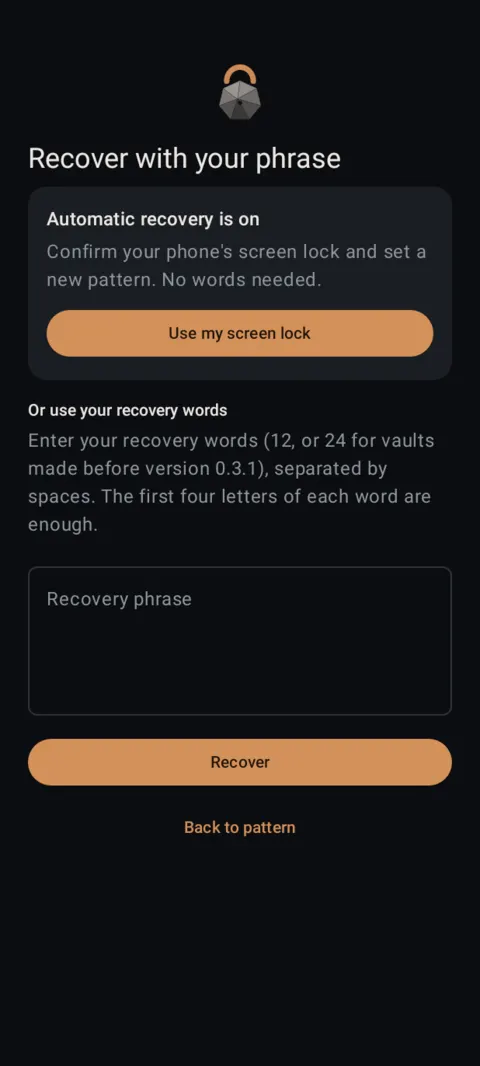
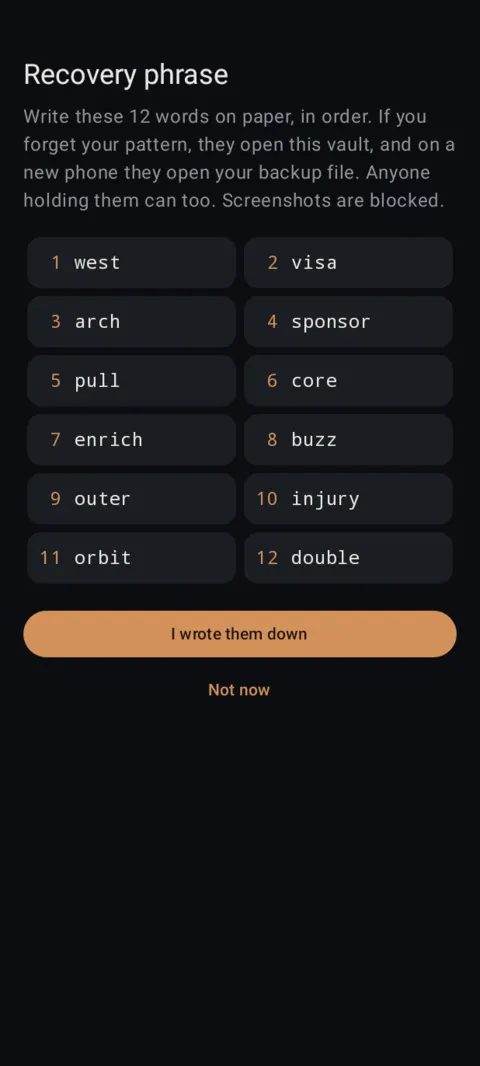
Tap Forgot? on the unlock screen, prove it's you, and draw a new pattern.
 Free on Google Play. No account, no ads, no tracking.
What it does
- 12 recovery words. They open your vault and your backups. Write them on paper and keep them safe.
- Recovery kit (PDF). A printable page with your words and a QR code. You choose where it's saved.
- Automatic recovery with Google. Your recovery key is backed up end-to-end encrypted to your Google account through Android's Block Store and comes back on a new phone. Google can't read it; Ragland Contracting never has it. It needs a screen lock on your phone.
- In version 1.1.1, automatic recovery also lets you reset a forgotten pattern by confirming your phone's screen lock. If someone else knows your phone's screen lock, turn automatic recovery off and keep your recovery words instead.
- A “Protect your vault” banner reminds you until automatic recovery is on or you've saved a kit.
How to use it
Menu names are exactly as they appear in Lockstone 1.1.1. The gear icon at the top right of the Vault screen opens Settings.
- Set it up now.Open Settings › Recovery. Check that Automatic recovery with Google is set the way you want.
- Save your words.Tap Show recovery phrase, write the 12 words on paper in order, then tap I wrote them down.
- Print a kit (optional).Save recovery kit (PDF) and print it or store it somewhere safe that isn't this phone.
- Forgot your pattern? Tap Forgot? on the unlock screen.Tap Use my screen lock if it's offered, or type your recovery words (four letters of each word are enough) and tap Recover.
- Draw a new pattern.Your files are untouched.
Plainly: if you forget your pattern and have no recovery words, no recovery kit and no automatic recovery, your files are lost. Nobody can recover them, including us. That's the cost of having no account and no master key.
Anyone holding your recovery words can open your vault, so keep them private. Making a new recovery phrase replaces the old words; backups made earlier still need the old words, so make a new backup afterwards.
Free Included in the free plan. See plans.
Questions
Can Lockstone support reset my pattern?
No. We never have your keys. Only your recovery words, recovery kit or automatic recovery can get you back in.
Is automatic recovery safe?
The key is end-to-end encrypted with your phone's screen lock before it goes into your Google backup, so Google can't read it. In 1.1.1 it also lets someone who knows your phone's screen lock reset your Lockstone pattern, so turn it off if that's a concern.
What are recovery words?
Twelve ordinary words that act as your vault's master key. They open the vault and its backups on any phone.
Does recovery work on a new phone?
Yes, together with your backup file: automatic recovery brings the key back on the same Google account, or you type your recovery words.
Related features
Related guides
- Photo vault with no account: what if you forget your pattern?
- How to back up and restore a photo vault
Prefer to watch? See the how-to videos.
No account. No ads. No tracking.
Lockstone is free for up to 100 photos and 10 videos per vault, with every security feature included.