Home › Guides › How to hide photos on Android: 3 ways compared
How to hide photos on Android: 3 ways compared
Last checked: 2026-11-10
There are three common ways to hide photos on an Android phone. Each is a good fit for someone. Here's what to look at so you pick the right one.
The short answer
- Your gallery app's hidden folder is the quickest if it comes with your phone and your screen lock is enough protection for you.
- A private folder built into your phone (many Android phones have one; names vary by maker and version) is a good fit if you also want to hide whole apps.
- An encrypted vault app is the choice if you want a separate pattern, no account, a decoy, documents and notes, and a backup you control.
Option 1: a hidden folder in your gallery app
Many gallery and photo apps include a hidden folder. It's free and already there. Things to check before you rely on one:
- What opens it: usually your phone's screen lock, so anyone who knows your PIN can open it.
- Whether it's backed up, and to which account.
- What happens to items in it if you uninstall the app or reset the phone.
Option 2: a private folder built into the phone
Many Android phones include a separate, locked space for apps and files (recent Android versions and several phone makers include one). It can hide whole apps, not just photos. Check:
- Whether it needs an account with the phone maker.
- How it's backed up, and whether it moves to a new phone of a different brand.
- What happens if you forget its lock.
Option 3: an encrypted vault app (like Lockstone)
A vault app keeps photos, videos, documents and notes inside its own encrypted storage, opened with its own pattern. Lockstone has no account, no ads and no internet permission, a decoy vault, locked albums, a document scanner and encrypted backups you save where you choose. It holds files, not whole apps.
Side by side
| Gallery hidden folder | Built-in private folder | Lockstone | |
|---|---|---|---|
| What opens it | Usually your screen lock | Its own lock or your screen lock | Its own pattern or PIN |
| Account | Depends on the app | May need a maker account | None |
| Hides apps | No | Yes | No (files only) |
| Decoy vault | No | No | Yes |
| Documents & notes | Photos mostly | Yes | Yes, with a scanner |
| Backup | Depends | Depends on the maker | Encrypted file in a folder you pick |
Don't forget the copies
Hiding a photo doesn't remove copies elsewhere: the original in your gallery, a cloud photo backup, chats, or a computer. Our guide to keeping private photos off your gallery walks through each one.
How to hide photos with Lockstone
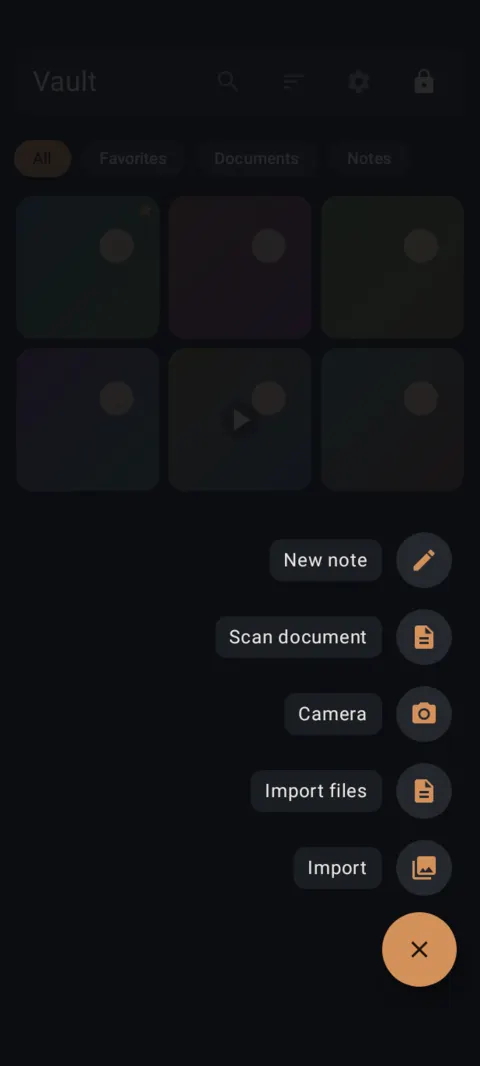
- Unlock your vault and tap + at the bottom right.The add menu opens.
- Tap Import.The Android photo picker opens. Choose the photos and videos you want to hide and confirm.
- Wait for “Encrypting 1 of N”.When it says Imported, your items are in the vault.
- Remove the originals.Tap Delete originals from Gallery. Android shows a confirmation.
- Import other files.+ › Import files for PDFs, documents and ZIPs.
- Or send from another app.In your gallery or file manager tap Share › Send to Vault, then draw your pattern.
Lockstone keeps it locked
A private photo and file vault for Android with a document scanner, locked albums and encrypted backups. No account. No ads. No tracking.
 Free on Google Play.
Questions
What's the easiest way to hide photos on Android?
Your gallery app's hidden folder, if it has one. For a separate pattern, no account and encrypted backups, use a vault app.
Can I hide photos without an account?
Yes. Lockstone needs no account or email. Your pattern is the only key.
Do hidden photos still show up in my cloud backup?
Copies that were already backed up stay there until you delete them in that service.
More: all guides · all features · how-to videos
No account. No ads. No tracking.
Lockstone is free for up to 100 photos and 10 videos per vault, with every security feature included.